How to Write a Skills Section That Actually Gets Read
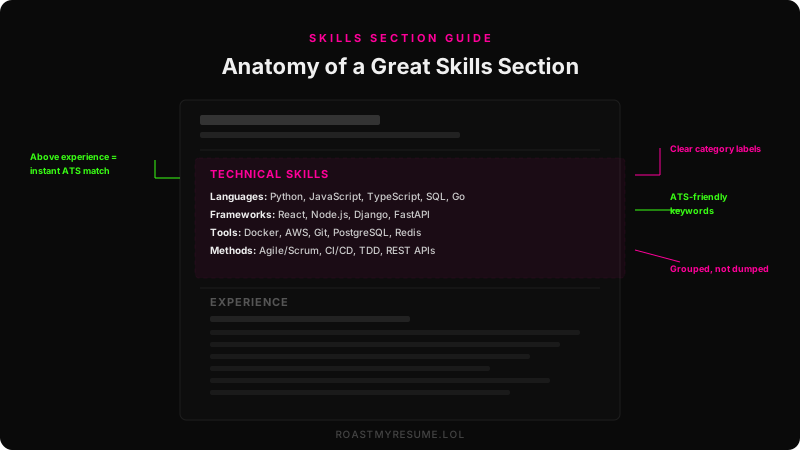
The skills section is the most misused piece of real estate on a resume. Most people treat it as a dumping ground: a random list of every technology, tool, and personality trait they can think of, jammed into a corner with no structure and no strategy.
That’s a problem because the skills section is one of the first things an applicant tracking system parses — and one of the first things a recruiter scans. If it’s disorganized, overstuffed, or full of meaningless buzzwords, you’re wasting the easiest opportunity to make a strong first impression.
Here’s how to write one that works for both the robot and the human reading it.
Where to Put Your Skills Section
Short answer: near the top, before your experience section.
Why? Two reasons. First, ATS systems parse your resume from top to bottom. Placing skills above experience ensures the system encounters your keywords early, improving match scores. Second, recruiters doing a 6-second scan hit the top third of page one. If your skills are buried at the bottom, they might never see them.
The ideal resume order for most people:
- Contact information
- Summary (2 lines, optional)
- Skills section
- Experience
- Education & certifications
Exception: if you’re a new graduate with minimal skills to list, you can place it below experience and let your achievements lead.
Hard Skills vs. Soft Skills: The Rule
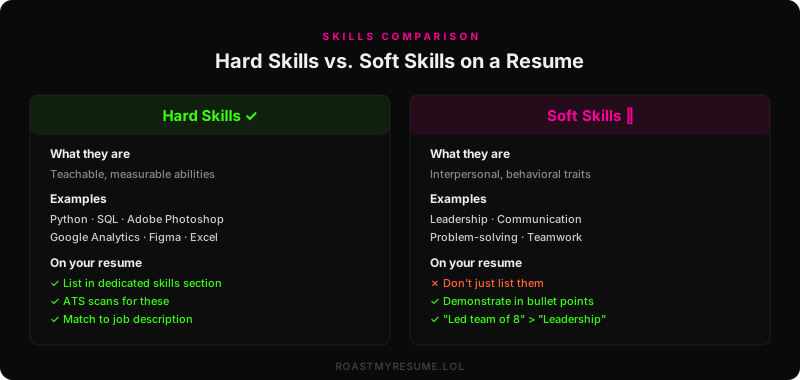
This is the single most important distinction in your skills section, and most people get it wrong.
Hard skills: list them
Hard skills are teachable, measurable, and specific. They include programming languages, software tools, certifications, methodologies, and technical platforms. These are what ATS systems scan for, and they’re verifiable.
Soft skills: demonstrate them
Soft skills are interpersonal and behavioral — leadership, communication, teamwork, problem-solving, time management. They sound nice but mean nothing in a skills section because:
- They’re unverifiable. Everyone claims “communication skills.” It’s meaningless.
- ATS doesn’t scan for them. No recruiter has ever set “teamwork” as an ATS filter keyword.
- They’re better proven than claimed. “Led cross-functional team of 8 across 3 time zones” proves teamwork and leadership in one bullet point.
This reads like a horoscope. It could describe literally anyone. Delete every soft skill from your skills section and weave them into your experience bullets instead.
The Best Format for a Skills Section
There are three common formats. Only one consistently works well for both ATS and humans.
Format 1: Categorized inline (recommended)
This is the gold standard. Group skills into 3–5 labeled categories with comma-separated values. It’s ATS-friendly, scannable, and space-efficient.
Frameworks: React, Node.js, Django, FastAPI, Next.js
Cloud & DevOps: AWS (EC2, S3, Lambda), Docker, Terraform, CI/CD
Data: PostgreSQL, Redis, Elasticsearch, Pandas, dbt
Methods: Agile/Scrum, TDD, REST APIs, GraphQL, Microservices
Format 2: Bulleted list
Each skill gets its own bullet point. This eats a lot of vertical space and is generally only appropriate if you have fewer than 8 skills to list. For most people, this wastes too much room on a resume that needs to stay concise.
Format 3: Tag cloud / columns
Some templates display skills as a grid of tags or a two-column layout. This looks modern but can cause parsing issues with older ATS systems that don’t handle multi-column layouts well. If you use this format, test it by pasting your resume into a plain-text field and checking if the skills still read correctly.
How Many Skills to Include
The sweet spot is 10–20 hard skills organized into 3–5 categories.
- Under 10 looks thin, like you’re just starting out (which is fine if you are — but if you’re not, it raises questions)
- 10–20 is the optimal range for most professionals
- Over 25 looks like you’re padding. If you list 40 skills, a recruiter assumes you’re actually good at maybe 10 of them
The interview test
Here’s a simple filter: only include skills you’d be comfortable answering questions about in an interview. If you put “R” on your resume because you took one stats class in college and haven’t touched it since, you’re setting yourself up for an embarrassing moment when the interviewer asks you to walk through a regression model.
If yes, include it. If no, remove it.
Tailoring Skills to the Job Description
This is where most candidates leave points on the table. Your skills section should be customized for every application. Not from scratch — but adjusted.
- Read the job description line by line. Highlight every tool, technology, and methodology mentioned.
- Cross-reference with your skills. Any match should appear in your skills section, using the exact wording from the posting.
- Prioritize matches. Move the most relevant skills to the top of each category. ATS and recruiters scan from top to bottom.
- Don’t lie. If the JD asks for Kubernetes and you’ve never used it, don’t list it. You’ll get caught.
Your resume says: “Photoshop, Illustrator, InDesign”
The ATS might not match “Photoshop” to “Adobe Creative Suite.” Add both: “Adobe Creative Suite (Photoshop, Illustrator, InDesign)”
Skills Sections by Industry
Software engineering
Backend: Node.js, Django, Spring Boot, gRPC, REST
Frontend: React, Next.js, Tailwind, HTML/CSS
Infrastructure: AWS, Docker, Kubernetes, Terraform, GitHub Actions
Data: PostgreSQL, MongoDB, Redis, Kafka, Spark
Marketing
Platforms: HubSpot, Marketo, Mailchimp, Salesforce Marketing Cloud
Paid Media: Google Ads, Meta Ads Manager, LinkedIn Campaign Manager
Content: SEMrush, Ahrefs, WordPress, Canva, Adobe Creative Suite
Finance
Tools: Excel (Advanced), Bloomberg Terminal, Capital IQ, FactSet
Software: SAP, QuickBooks, NetSuite, Tableau
Certifications: CFA Level II Candidate, Series 7 & 63
Design
Prototyping: InVision, Principle, Framer, Maze
Research: User Interviews, A/B Testing, Heuristic Evaluation, Usability Testing
Front-End: HTML, CSS, Basic React (for handoff collaboration)
Common Skills Section Mistakes
- Listing Microsoft Office. It’s 2026. Excel proficiency is assumed. Only list it if the job posting specifically mentions it — and then specify your level (pivot tables, VLOOKUP, macros, etc.).
- Including “Microsoft Word.” No. Just no.
- Rating yourself with skill bars. Those 4-out-of-5-star ratings are meaningless and ATS can’t parse them. What does “4/5 in Python” even mean? Don’t use them.
- Lumping everything together. A flat list of 30 skills with no categories is unreadable. Group them.
- Listing skills you can’t back up. If “Machine Learning” is on your resume and you can’t explain gradient descent, remove it.
- Using the wrong vocabulary. “JavaScript” vs. “JS” vs. “ECMAScript” — use whatever the job description uses. ATS keyword matching can be case-insensitive but abbreviation-inconsistent.
What About “Proficiency Levels”?
Some resume advice suggests labeling skills as “Expert,” “Advanced,” “Intermediate,” or “Beginner.” In theory, this provides useful context. In practice:
- It opens you to lowball yourself. Listing React as “Intermediate” when you’ve built three production apps is underselling.
- The labels are subjective. Your “Advanced” might be someone else’s “Intermediate.”
- ATS ignores proficiency labels. It only checks if the keyword exists.
If you feel the need to show varying levels, a better approach is to group by category and let your experience bullets demonstrate depth. If you built an API in Go, you don’t need to write “Go (Advanced)” — the bullet point proves it.
Skills Section Checklist
Before you finalize, run through this:
- Are all skills hard/technical skills, not soft skills?
- Are they organized into 3–5 labeled categories?
- Do they match keywords in the job description?
- Is the total count between 10–20?
- Could you answer interview questions about each one?
- Is the section above your experience section?
- Are you using comma-separated inline format (not bullets)?
- Have you avoided skill bars, ratings, and pie charts?
If you checked all eight, your skills section is ready. If you missed a few, go back and fix them — it’s one of the easiest sections to get right and one of the most impactful for ATS scoring.
The Bottom Line
Your skills section isn’t a biography of everything you’ve ever learned. It’s a targeted keyword match between what you can do and what the job requires. Keep it organized, keep it honest, and keep it near the top of your resume.
Hard skills, categorized, comma-separated, tailored to the job description. That’s it. That’s the formula.
Want to know if your skills section passes the ATS?
Upload your resume for a free AI audit. We’ll flag missing keywords, formatting issues, and tell you exactly what to fix.
Roast My Resume — Free →